
Online ordering that works with your reps, not around them
Your customers trust your people. PIMento™ takes the routine reorders off their plate and tells them where to spend the time they get back.

Every account, every order, and who to call today
Online orders land in the rep's view the moment they're placed. Accounts that go quiet, or keep browsing without buying, rise to the top of the list.
Every follow-up list, built and refreshed for you
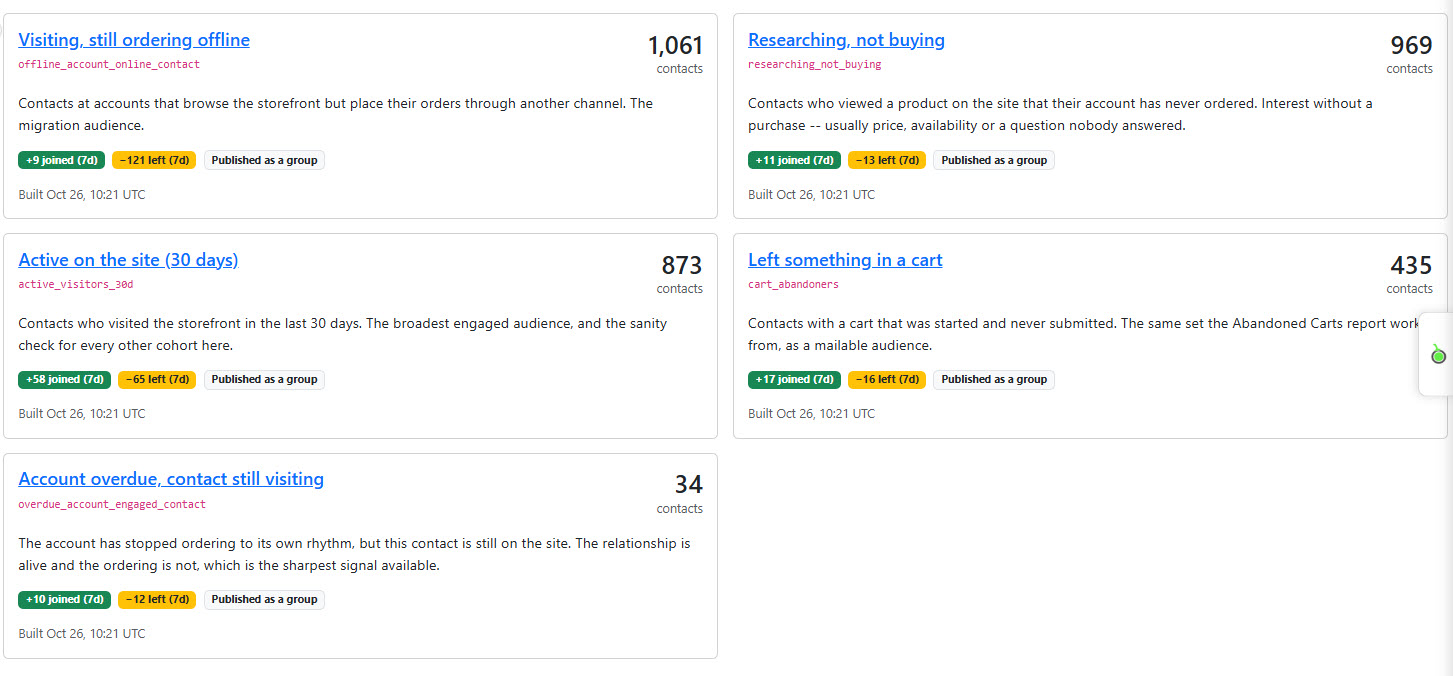
PIMento runs AI across the data lake, where storefront visits, ERP orders and contact history all come together, to work out what every contact is actually doing: who browses but still orders by phone, who researched a product and didn't buy, who left a cart behind. The cohorts rebuild every day, so reps never start from a blank spreadsheet.
- Visiting, still ordering offlineThe activation list: contacts who already use the site, ready for a nudge to place the order there too.
- Researching, not buyingInterest without a purchase, usually a price, stock or product question a rep can answer in one call.
- Left something in a cartOrders that are almost done, recovered with a quick follow-up or an automatic reminder.
- Account overdue, contact still visitingThe relationship is alive but the ordering isn't. The sharpest signal a rep can get.
Always current
Each cohort shows who joined and who left this week, so reps see momentum, not a stale export.
Ready to send
Every cohort can be published as a group, ready for an email campaign or a rep's call list in one click.
Focus on the right accounts
Instead of calling down an alphabetical list, reps start with the people most likely to order today.
Your sales team, multiplied — not replaced
Tools to communicate with and score customers, plus AI that builds cohorts and recovers abandoned orders, all working for your reps.
Less typing, more selling
Routine reorders place themselves. The hours go back into accounts, quotes and projects.
One version of the truth
Reps quote from the same catalog, pricing and stock the customer sees online.
The right call at the right time
A nightly list of who went quiet, who's browsing and which quotes are about to lapse.
Talk to customers in one place
Message accounts, share quotes and follow up from the same screen that shows their orders, so every conversation has the full picture.
Every account scored
Customer scores rank accounts by value, growth and risk, so reps know where their time pays off most.
AI-built cohorts, recovered orders
AI groups accounts into cohorts automatically and catches abandoned carts, prompting a follow-up or recovering the order before it's lost.
What sales leaders ask us
Will online ordering cut out my sales team?
No. It takes the typing, not the relationship. Reps see every online order and spend the time saved on growing accounts.
Can a rep place an order for a customer?
Yes. Reps can place an order for a customer, or build a quote and share it so the customer can review, adjust and complete it. It’s a collaborative order that moves at the pace and timing that suits both of them.
Who gets credit for the order?
The rep is tagged to the order, whether they placed it or shared the quote it came from, so it’s always clear who did the work.
Give your reps their mornings back
See the rep view on your own accounts in a 30-minute walkthrough.